Category: Uncategorized
Plastic Surgery To Make Other People Look Better
Well, yesterday (although it seems like an age ago), I had laser surgery. I had a few tests, and then took up a poorly matched seat in the slightly too yellow cream coloured waiting room with the others. As I sat the interminable minutes, waiting for the actual surgery, I started to think about risk and poker.
I realised that I had essentially ignored the risk of something bad happening because the chance was small, but actually I knew from poker that you sometimes make calls with a small risk, but it’s not just the risk, it’s also the consequences that determines what the right choice is. As I sat and thought, the old man sitting across from me nervously swatted at a fat fly that had left the safety of the reception plant and landed, rather comically on his balding head.
The only stat I had with me was the video in the corner telling me that 98% get 20/20 vision or better. I didn’t have any other clinical outcome stats with me, but from what I vaugely recalled, I estimated the other 2% as 1.5% essentially unchanged (possibly after further correction), and 0.5% as worse vision that required me to wear glasses and take eye drops for the rest of my life. I didn’t really know if these figures were accurate, but they sounded about right. The old guy grinned at me as I slapped at my hair around where the fly was trying to land. Just because a risk is small doesn’t mean it shouldn’t be factored into your decision.
Anyway, pulling out my mobile phone I estimated how much I would be prepared to pay for surgery that was guarranteed success, and figured that would be around 7000 pounds. Then I estimated how much I would have to be given to be prepared to accept a lifetime of thick glasses and eyedrops. I couldn’t be completely sure, but I estimated it as around 2 million pounds. I was spending 3000 pounds on the surgery, and I could expect to save a minimum of 1000 pounds on glasses costs if it was successful. So what’s my expected value?
(7000 – 3000 + 1000) * 0.98 + (-3000) * 0.015 + (-2000000 -3000) * 0.005
I sat looking at my mobile phone calculator, realising that I’d made a decision with an expected value of -5160 quid, and no matter how I tweaked the numbers it wasn’t going to be positive.
After a little while of that, I went into surgery. It was horrible. I should say at this point that my experience is probably not typical, I certainly know other people who have had it done and found it strange, but not really all that bad, nobody else that I know has ever talked about the procedure being painful. I don’t know if he didn’t use enough anasthetic or if I just didn’t react to it very much, or what, but it was painful and very distressing. He didn’t seem to believe that it was hurting either, and even at one stage asked me with some incredulity in his South African accented voice “Is that hurting?”. That was in between berating me for not being able to keep my eyes still. Afterwards I sat in a darkened room for a while just getting over the trauma. Unable to keep my painful and bruised eyes open for more than a few seconds at a time, I was lucky to have my fiance to take me home. The next six hours were painful and uncomfortable, and after so much pain I was convinced something had gone wrong, but after that things started improving quickly. Even when I left the clinic, in the few seconds I could keep my eyes open I could tell that my distance vision, despite the glare and weird stuff was much better. Today, my vision is massively better. I can’t stop myself reading signs and number plates, and it’s nice to see slates on the roofs of houses without fuzz. I find that I expect to be able to read anything that’s writing even if it’s very very far away, and it confuses me when I can’t. We went to the park and watched squirrels and to the cinema and sat wherever we liked (I usually have to sit at the front). The after check up this morning told me that I was healing well and already slightly better than 20/20, with the possibility that it could improve even more over the next few weeks. There’s still glare around bright or white objects, I have to take a plethora of eyedrops every few hours for a couple of weeks, and wear eye shields at night, and I find it very weird focussing up close, but I already have a much better experience than I did before the surgery when trying to find my way around.

So I’m satisfied with the result, but as every poker player knows, it’s not the result, a thing chosen by chance, that determines whether something was the right decision or not. Knowing now how nasty it was I don’t think I would ever do it again (although perhaps talk to me in 5 years when the memory of the pain is gone and the experience of good vision is a persistent reality). My fiance told me afterwards that the old man who had gone in while I was recuperating in a darkened room had been rushed out to an ambulance. I hope he wasn’t experiencing the other side of that expected value calculation.
Crossbrowser Inline SVG
I’ve been wanting to use inline SVG for a while, but since it isn’t supported by IE, I’ve been reluctant to make 80% of the worlds browsers unable to read it.
Here is one solution that I found after playing with XSLTs. It uses Mark Finkle’s SVG in IE behaviours, but on his site, he has to serve the example files in two different ways to get them to work in firefox and ie, because of mime-type issues.
My way around that is by using a simple (pretty much the simplest possible) client side XSLT.
Garmin nüvi 360T, a short review.
I’m aware that quite a few people were visiting this site to read about the tomtom that I reviewed earlier. I felt a little bad about this, since I couldn’t compare it to other GPSes, and I complained a lot about how I felt it could be so much better.
The time came when I had to return the tomtom to it’s rightful owners and I bought my own GPS. In order to be able to write a comparative review for all those who were reading the tomtom review, I bought a Garmin Nüvi 360T (europe).
I’ll go into a little more detail, but the final analysis is that despite all of its good features, the TomTom Go is simply better at giving directions, and since that’s the most important feature, anyone trying to decide between them should get the TomTom.
There are a lot of things I like about the Nüvi over the TomTom Go.
The size and shape are much better. The GPS is one of those things you don’t want to leave in your car, so to have one that you can slip easily and comfortably into your pocket is more of a benefit than you might think. The TomTom is fat and weird shaped and doesn’t fit into a pocket without stretching it. The Nüvi fits snugly and comfortably. I also think it’s shape and weight is a lot more aesthetically pleasing, although you do lose some of the screen size, which is a shame. The windscreen clip is a lot sturdier and better made as well. The TomTom used to fall off occasionally and rattle about on top of the dashboard. Not so the Nüvi. It slots nicely into place and stays there.
The Nüvi has a speech synthesis engine, so it can (attempt) to say anything. It makes good use of that by including the street names as part of the spoken directions. This doesn’t help with finding your way all that much, but it makes you feel more a master of your destiny – as if you are a partner in finding your way, not merely a slave to the machine, which I did feel a bit with the TomTom. It can also read SMSes sent to your phone when it’s paired with the GPS, which is a cool feature, although it’s still early days, and I’ve not tried that yet. Speaking of which, I have another feature for the GPS system of my dreams – if someone texts a postcode or an address to your phone when it’s paired with a GPS, the GPS should automatically give you the option to add it, or route to it. The down side of the speech synthesis engine is that it all sounds a little computery, and much less natural than the TomTom, this will bother some people more than others. The speakers are also a bit quieter than the TomTom. This is fine in a quiet car, but if you have a car that gets noisy at high speeds and you’re listening to the radio, it could be a problem. However, the Nüvi has a work around for this that is much better than the TomTom – it has a normal headphone socket on the outside of the device, so you can plug it into the line in on your car stereo and get the voice directions through your car speaker system.
Rather than giving you the opportunity to control your iPod like the TomTom, the Nüvi has a pretty decent MP3 player built in, and enough space for a fair few tracks with the opportunity to add more space with the unused SD slot too. When plugged into your computer it shows up as a two standard USB external drives. The MP3 player works while navigating, and it pauses while voice prompts are being given to you. This all works really well. It also has audible.com integration, but sadly the UK version of that is not a particularly good deal price wise, so I haven’t tried it. Because of it’s slim profile and headphone socket, you can actually use this GPS as an MP3 player even when you aren’t in the car.
The out of the car experience is quite good. The GPS aerial flips up when you want to navigate, but when you don’t want to navigate, you can still use all the functions. I found the TomTom quite annoying to use when there was no GPS signal. The Nüvi allows you to specify where you are now, and can route plan to a destination of your choice with no signal. Once you’ve route planned, if you have the GPS aerial down, it gives you the option to simulate the journey. This is a really cool feature, although it would be better if you could speed up/slow down/fast forward/rewind the playback. One mistake is that it doesn’t mark the destination on the map unless it has a planned route to get there.
The Nüvi 360T also comes with an FM antenna, and it receives traffic updates broadcast over FM. When it has traffic information near you, you can tap an icon that appears on the screen to get more information, or to reroute to avoid trouble. I’m really pleased with this, and it really works, although I haven’t yet used it enough for it to save me lots of time by rerouting me.
I find the map display clearer than the TomTom, but it’s quite strange and cartoony, so that will be a matter of taste, rather than a general observation. There is a lot less information presented on the Nüvi screen, which is a shame. I liked knowing the current time, my current speed, time left, etc. The Nüvi just shows expected arrival time and distance to next turn. There is a trip statistics screen on the Nüvi, which is nice, and has some other stats that the TomTom doesn’t, but you don’t want to be tapping the screen while you’re driving. Neither the TomTom nor the Nüvi zoom out as much as I’d like when you have a long distance before the next turn, but the Nüvi zooms out much much less than the TomTom. The Nüvi is also a lot less configurable in its display than the TomTom (although it’s nice that you can specify an image for your own vehicle). The Nüvi allows you to say what kind of vehicle you’re driving, and it will use that to estimate different speeds on different roads. I like that, but I’m only impressed by it if it will give you different routes based on your vehicle width and height. I have no idea if it does or not, since I haven’t tested it yet.
The Nüvi seems less configurable, but it does have some quite remarkable extra pieces of software, which it calls the “Travel Kit”. You can have Phrasebooks in a variety of languages and bilingual dictionaries from Oxford University Press. The phrasebooks and dictionaries can also speak their translations using the built in speech synthesis. The Travel Guide gives you interesting information about tourist spots, including prices, phone numbers and websites, as well as being integrated with the direction system. The Picture Viewer lets you carry around your JPEGS and photos, which given it’s pocketable form factor, can be good for showing to people. You also have a World Clock, a Currency Converter, a Measurement Converter and a standard calculator. The Phrasebooks, dictionaries and travel guides are incomplete examples as shipped, you have to upgrade them if you want the full information.
The bootup time for both is slow, but I have the impression that the Points of Interests are more accurately located. I’m not totally sure of this, since I haven’t navigated to many of them yet, but so far, they’ve been better than the TomTom ones, which were frequently a block or more out.
Compared to the TomTom however, there are a few unforgivable shortcomings in the Nüvi. It’s road detail seems lower, so it often gives you less useful information by voice. It doesn’t really understand the concept of miniroundabouts, let alone double mini roundabouts. You couldn’t completely trust the voice with the TomTom either, but at least with the TomTom, you’d be able to work out what was going on by looking at the screen, and although this is usually the case with the Nüvi, it isn’t always. It says too much that is redundant, (like “please follow the highlighted route”, “recalculating”, or “enter roundabout”) and not enough that is useful, (like “exit roundabout”, “take the second right”). With the TomTom, if you stopped for petrol, it would often know the layout of the car park at the petrol station, which is not necessary, but reassuring. The Nüvi generally doesn’t.
The software that comes with the TomTom is slick and easy to use. No software comes with the Nüvi in the box. On the one hand, this is because it appears as a USB drive on your machine, which is nice, but it doesn’t inspire confidence. You can download an updating package, which will keep it up to date easily. Apparently you can also use MapSource, which from the screenshots looks quite good, but bizarrely, downloading this isn’t enough. You can’t run it at all in fact, until you get sent a Map Update DVD which apparently might happen once a year or so assuming you register your device.
What it comes down to is that, although I like much about the Nüvi, you buy a GPS for helping you navigate, and the TomTom Go is simply better at that job.
Engaging
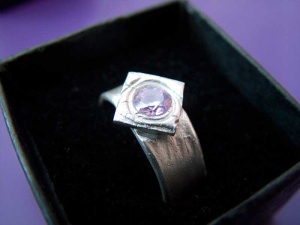
Last week, I rose early, travelled far, made a ring for my beloved, dashed home, prepared a meal, and then proposed. Busy day. We’re getting married on the 11th of August in a town in northern Germany near Dortmund.
If you know and like me or her, you’re invited to the wedding, which I hope will be quite informal but enormous fun. You should be receiving invitations soon if I’ve got your contact details (once we’ve made them all), otherwise feel free to contact me and mention that I haven’t sent you an invite yet.
She loves lizards which is why I made the ring in the shape of a lizard. Here’s me burnishing it.

and the result, after treating it:

In case the lizard didn’t turn out well, I also made a back up ring, and earrings (she likes earrings, so they were a safe choice) at the same time.

OpenID
You may have realised from my technical type posts that I’m a big fan of decentralisation, at least when it comes to all things internettery. In that vein, I now have an openID thanks to phpMyID. It was very easy to install and get working, took me less than 5 minutes. https://kybernetikos.com/openid is now my openid end point, and I’ve so far successfully logged on to a bunch of openId services including ficlets.com a social fiction writing site and jyte (if you enjoyed anything on this site and want to pop over there to give me some cred for it, that’d be nice). If you don’t know how/want to set one up yourself on your own server, you can use a service like myopenid.com. You already have one if you have a yahoo account, or a wordpress.com blog.
I’d love to see this kind of single sign on succeed since single sign on is needed and the alternatives are MS passport style things. If you haven’t already got an OpenID, let me encourage you to get one, and start using it.
RIAA Math
01. Amount the RIAA asks for per song in damages when they file suit in the US = $750
source
02. Price of song on iTunes = $1
source
03. (01 / 02) Number of lost sales they implicitly claim you caused by downloading rather than buying that song (although note, they’re claiming more than that, since they can’t sue for damages sustained by Apple) = 750 lost sales
04. Number of times Nellys “Over and Over” was downloaded in the US (to Jan 2005) = 5,827,833
source (using figures from bigchampagne.com)
05. Number of simultaneous P2P users worldwide = 9,670,552
source
06. Number of US simultaneous P2P users = 6,980,000
source
07. (06 / 05) Proportion of P2P file sharing done in the US = 72%
08. (04 / 07) Probable number of times “Over and Over” was downloaded worldwide = 8,094,212
09. (08 * 03) Number of lost sales for “Over and Over” by the RIAA reckoning of 750 per song = 6,070,659,000
10. Population of the world = 6,525,170,264
source
11. (1 – (10-09) / 10) Proportion of the world who didn’t buy “Over and Over” but would have if there had been no file sharing = 93%
That’s right, 93% of the entire population of the earth, (man, woman, child and baby), wanted to pay money for “Over and Over”, and would have too, if it weren’t for those pesky file sharers. Presumably the remaining 7% were people who actually did buy “Over and Over”.
Domino Computation
I try to explain this so that someone with no technical background can understand it, but I go pretty quick in an effort not to bore those who already know this stuff. I hope I found the right balance for you, if not, jump to the pictures and videos. This describes how I worked out how to make a computer (well, calculator) with dominos. If such a thing doesn’t interest you, you better not read any further.
Introduction
I’ve been interested in primitive and alternative computation since I learnt that computers were made of pretty much nothing but switches. 10 years ago, I was thinking of pneumatic computers, when I first met roo we had a discussion about computers made of wood and elastic bands or cockroaches, and chatting to woodly got me thinking about computers made of dominos.
Theory
To really make a complete computer, I’d need a NOT gate, which sadly is pretty complicated with dominos – I figure you’d need a clock and a mechanism to stand dominoes back up again – I’m imagining a piece of string tied to the pendulum of a grandfather clock, something like that anyway…
Luckily though, you can make some useful computation circuits without the NOT gate. To make things as simple as possible, we restrict ourselves to binary numbers (poor old Babbage, doing everything in base 10). Binary numbers are just another way of writing numbers, any whole number can be easily represented as a binary number – it works just like decimal, except that the individual places never go above 1, and each position doubles the value of the digit instead of increasing by 10 times. 101 in decimal is a hundred and one (1×100 + 0x10 + 1×1), whereas 101 in binary is five (1×4 + 0x2 + 1×1). Adding two numbers together is the same as in base 10 as well, except instead of carying 10, we have to carry 2.
Here’s the longhand calculation for the decimal sum 574 + 927 = 1501
4 + 7               = 1 (carry 1)
7 + 2 + 1 (carried) = 0 (carry 1)
5 + 9 + 1 (carried) = 5 (carry 1)
0 + 0 + 1 (carried) = 1
And now the longhand for the binary sum 101 + 11 = 1000 (in decimal, that would be 5 + 3 = 8)
1 + 1               = 0 (carry 1)
0 + 1 + 1 (carried) = 0 (carry 1)
1 + 0 + 1 (carried) = 0 (carry 1)
0 + 0 + 1 (carried) = 1
You can see that in binary you’d need loads more digits to represent the same number, but that it simplifies things because you only ever have to deal with 0 and 1 (if only the Nintendo Brain Training game only gave me sums with 0 and 1 in them). Looking at the steps we took, you can see that in order to add two numbers together of any size (in decimal or binary), you need to do many steps of adding together 3 numbers of only one digit. We take a digit from one, a digit from the other, and the carry from the previous calculation, and produce a digit for the answer, and the carry for the next step.
When working with binary there are relatively few possibilities so it can be nice to see these things in a table. On the left are all the possible inputs, and on the right are the outputs we want. This is called a truth table, and this is the truth table for what’s known as a Full Adder.
|
|
In dominos, it makes sense to represent a 1 as the dominos being knocked down, so, this table tells us that if we could create a series of dominos that had 3 input lines of dominos that resulted in two output lines, where the first was knocked down if one or all three of the input lines were knocked down, and the second was knocked down if two or more of the input lines are knocked down, then we can build a sequence of dominos to add any number together.
Actually coming up with a domino chain to do that is pretty complicated, so I simplified the problem again. Rather than adding three numbers, you can create something simpler that only adds two numbers, and chain two of them together so that it ends up adding 3 numbers. This simpler component is called a half adder, and the truth table looks like this.
|
|
If you can make a half adder, then you can stick two of them together to make a full adder. If we can make a half adder in dominos, this means that we could stick a bunch of them together and if we had enough of them, add any two numbers together, simply by flipping some dominos and reading out the result.
Practice
So can I make a half adder in dominos? Here’s the planning for the sum part.

My sum design used two “Inhibit pass through” gates and an Or gate. The inhibit pass through gate is a domino gate I invented that only lets one of the two input lines continue. The truth table looks like this
|
|
In domino terms, we have two lines of dominos going in, and two coming out. There’s a middle domino that twists depending on which hits it first, and so only allows one of the lines to continue. An OR gate is really easy in dominos, just have two lines merge, and the resulting line will fall when either of it’s input lines falls. With that I was able to create the sum part.

The final part of the half adder is the carry. This only falls if both of the inputs fall, it’s also called an AND gate. I stuck a few dominos together to make a large domino that would fall if hit, but only if a blocking domino placed side on to it also fell. Here’s a close up of it being blocked by the side-on domino.

Result
So, with everything together, does it work?
Domino Half Adder, Input 00, result 00

Domino Half Adder, Input 10, result 10
Domino Half Adder, Input 01, result 10
Domino Half Adder, Input 11 result 01
Yes. Given enough time and dominos I could build a domino chain to add numbers of arbitrary size.
Thanks to Sarah who helped with the filming, and Woodly who discussed the idea with me, and encouraged me to build it.
Update: Bonerici has constructed a domino computer using his own domino logic gate, an XOR constructed in quite a cunning way. I haven’t tried building one yet, but it looks good, and enables a domino computer more palatable to the purists (who were never happy with me sticking dominoes to each other).
Update: A lego half adder.
Your honour, this evidence contradicts the witnesses last statement.
In which I try to overcome my native abhorrence of the buzzword du jour and end up jumping on the bandwagon in my own particular way
Forgive the title, I’ve been playing Phoenix Wright.
I hung out with some of the Web2.0 crowd recently, and although there was predictable talk of broken business models, the vibe was positive, the environment was nice, the people happy, and the future was bright. It seemed like a bit of a contrast with Rob Pikes polemic that I read recently. He is specifically talking about Systems Software Research, but actually I’ve heard similar views about almost all aspects of computer science. When you consider it like that, I can believe that at least with the theory of computer science (including operating systems, databases, programming langauges), humanity made some enormous steps a few decades ago but has been making baby steps ever since.
One of the reasons people (including me) give for complaining that Web2.0 is overhyped is that it is not a “new paradigm”. People have been sharing video over networks since the clubs that sent out flipbooks in the post. They’ve been sharing public diaries over computer networks since the days of unix and .plan. The web was invented to be read/write, yet it’s only now that that is filtering down to the public. I remember the days when a blog was called a “web page”. For conversations and debate, little has improved on the flexibility and power of usenet and irc. However, the revolution is not in what is possible, it’s in who is using it. If we can truly put the Joe in Web2.Schmoe, then that is something to get excited about. The reason “social” type applications have really taken off is at least partly because these kinds of applications need a broad level of adoption to be feasible. And as more people and more things are networked, new tiers of applications will become useful, and be written.
Most applications of the internet were invented to be subversive, moving control to the (necessarily skilled, back then but less so now) user, and away from authority figures and institutions. When the public first started to get involved and interested, it was too late, the anarchic applications and protocols had already been sidelined, legislation was steamrolling forwards, slowly but surely, and people didn’t even know the values that guided the original creations. That’s why practically nobody ever used http put (wiki was built in to HTTP 1.1). But there is a fight back. It may look like we’re building a whole new layer on top of old technology that was always designed to do what we want, but the reason for that is that we have to be where the people are. Now the people are here, we have to bring the original internet back, in all it’s anarchic, social and postmodern glory. That is what Web2.0 is.
And it’s working.
TomTom Go 710 – a review
Update: for a comparison with the Garmin Nuvi, check this review
I’ve been using the TomTom Go for about 3 months now. On the whole, I’m happy with it, it’s very useful with a minimum of fuss. However, considering this is regarded as being a good example of the breed, I’m a bit disappointed with some very obvious shortcomings.
First the gratuitous: It beeps with the loudest and most disturbing beep everytime I go near a speed camera. You can turn the function off completely, by removing the speed camera database from the device. Given that it also knows my speed (to the extent that it warns me if I ever exceed the limit), isn’t it a bit stupid that it feels the need to alert me to the fact that there is a speed camera set to go off at 40 mph as if it were a world ending catastrophy, even when it’s perfectly aware that I’m crawling along in a queue of traffic at 10mph. A much better solution would be to only alert me to the presence of a speed camera if I’m near or over the speed limit.
It’s nice that you can set that the distances be measured in yards/miles or metres/kilometers, however, I’m from that unhappy few generations in the UK that are happiest with meters for short distances and miles for long distances. Why can’t I set that? Better yet, why can’t I set the short distances in meters and say that the long distances should be in whatever the road signs are in, km in europe and miles in the UK/USA.
When it comes to trip management, I’ve seen bike computers that are more advanced. I’d like to be able to plan multiple journeys over multiple days. Relying on the “recent destinations” is ok, but it’s not good enough for a grown up system. And why the restriction to only one ‘avoid’ or ‘via’ per trip? That’s silly and can really get in the way. Sometimes it’ll tell you that it’s impossible to plan a route with the avoid or via, that it’s clearly not – it’ll do it as two separate journeys happily enough. It’s good that it gives you the options to avoid toll roads, but I’d like to know what the trade off is – I’d like it to tell me the time difference between using all roads, or only non toll ones – what I’d pay in toll, and what I’d pay otherwise in miles and fuel. Speaking of which, although there doesn’t seem to be a bluetooth standard profile for ‘car’ that would let it get at the mileage and fuel usage, there’s no reason why it couldn’t allow me to enter the fuel amounts and cost when I fill up so it could record and manage that as well.
It’d be nice to have a bunch of stats at the end of the trip. Distance travelled, average speed, rest stops, fuel stops, time, comparisons to other times you’ve made the same journey. Maybe even some graphing and mapping. The time estimates for different parts of the journey could be taken from history rather than simplistic statistics – that would even inform nicely different route options.
The thing has bluetooth for mobile data and handsfree calling (nice touch), but why doesn’t it let me download the gps locations of my entire last monthsworth of trips, and then let me geotag my photos with it, or show me pretty maps with my driving marked on? With mobile data, it could even mark on recent trips taken by friends, optionally with their photos, when you’re out there driving or walking. That might get a little busy I suppose, but it’s an option for adding interesting social data. Why can’t I use it with my own mapping software and my laptop should I want to? I haven’t really used it’s mobile data functionality, because I’m concerned about the cost of phone network data, but it would have been nice if it had a wifi connection, and could automatically connect over any available wifi to receive updates.
Then we come to accuracy. Generally it’s fine, but you start to notice things that are pretty jarring. There are about 15 miles of the A1 that according to it are in a field, some way to the west. It will sometimes say “keep left” when it means “turn left”, or “keep right” when actually, there’s no keeping involved, and your next action is to turn the opposite way. It’s all very well knowing which bit of the road you’re on and what you need to do next, but it’d be a massive help if it actually knew which lane(s) you needed to be in for your next manoever and warned you about that. It also has a nasty habit of warning you about the next turn just as you have another option to choose. It’s got a map there, it could easily check to make sure that you aren’t just coming up to a turning, and give you the next instruction a few seconds later so it’s not confusing. In fact, it’s better to receive any instruction when there isn’t an immediate road decision to be made. Generally the accuracy of the roads is good (barring one or two mistakes), but you’ll still need to look at the map every now and then rather than blindly trusting the voice and it’s disembodied instructions.
The map by the way does tend to be clear and well presented, and less likely to confuse than the voice. It’d be nice to have an overview map or something that gave a greater appreciation for what was coming up, but considering the screen size, that probably wouldn’t work. It has 2d and 3d views, although I generally find the top down 2d view the most useful. The touch screen interface is really nice to use.
When it comes to things other than the roads and houses on them, it’s accuracy is much much worse. They’re called Points Of Interest on the tomtom, and although it’s massively useful to have them, you should count on driving around the rough area of the symbol to find them. It took me straight to the nearest hospital in a strange place when I needed it, which was nice, but a few days ago, I was trying to get to the nearest post office depot. It took me down a tiny deadend of a side road with no turning space before proudly announcing “you have reached your destination”. Looking around, sure enough, I saw the Post Office depot, very close, just on the other side of a railway line. It took me half an hour to get to it from there, with no help from the the tomtom which was convinced that I had reached my destination and should probably turn around when possible to get back to it. I’ve had similar problems with petrol stations which are often on the opposite side of the road and a block or two away from where they’re supposed to be. Directing us to the nearest cinema we nearly ended up in the river, although it did have the rough area right, another 5 minutes of driving around nailed it. Although once you discover this problem, you can set a favourite to a specific location, it’d be nice to be able to correct the POIs on the device (assuming it is impossible to get them all right the first time). The way that if you go off what it thinks of as the road, it just draws a straight line to the nearest road, is ok most of the time, but it would be nicer if it remembered how you got there, and so took you back by the same route (and would it be too much to ask for it to update its internal map too?), instead of giving you nonsense instructions.
That same journey showed up another problem. It tried to join me onto a main road from a side road that had traffic lights set on timings to let only 2 cars through each time. The fact that I was in a huge queue meant I sat on that stretch of road for 20 minutes. It should know the timings on the traffic lights, and if it’s finding that I’m crawling, I’d like it to offer other alternatives. In fact, there are a number of decisions I can get better information for than it. If I can see that the traffic is terrible ahead, I might like to know alternative possibilities as I’m driving towards them so I can adjust the plan – perhaps alternative routes could be marked, with some indicator to show how much worse they are than the primary route.
My conclusion is that I’m really pleased to have a GPS in my car when I’m travelling, but it still feels like it’s early days. There are so many obvious improvements to the software, and data accuracy needed that it’s hard to imagine that 2006 was supposedly the year of the GPS, it’s still very immature, completely unable to learn from or store history, it’s a device that does it’s job the way it thinks it should, and although that’ll work well most of the time, it’ll be very frustrating the rest.
 kybernetikos