-
Local caching and serving of webapps.
-
Using behaviours and VML to render SVG in IE
Crossbrowser Inline SVG
I’ve been wanting to use inline SVG for a while, but since it isn’t supported by IE, I’ve been reluctant to make 80% of the worlds browsers unable to read it.
Here is one solution that I found after playing with XSLTs. It uses Mark Finkle’s SVG in IE behaviours, but on his site, he has to serve the example files in two different ways to get them to work in firefox and ie, because of mime-type issues.
My way around that is by using a simple (pretty much the simplest possible) client side XSLT.
links for 2007-05-09
-
Helping you get the sleep/work balance right.
-
A US Postal address, along with some hints on how to buy things in the USA. With the current exchange rate you’ll probably save 50% on items like laptops.
Garmin nüvi 360T, a short review.
I’m aware that quite a few people were visiting this site to read about the tomtom that I reviewed earlier. I felt a little bad about this, since I couldn’t compare it to other GPSes, and I complained a lot about how I felt it could be so much better.
The time came when I had to return the tomtom to it’s rightful owners and I bought my own GPS. In order to be able to write a comparative review for all those who were reading the tomtom review, I bought a Garmin Nüvi 360T (europe).
I’ll go into a little more detail, but the final analysis is that despite all of its good features, the TomTom Go is simply better at giving directions, and since that’s the most important feature, anyone trying to decide between them should get the TomTom.
There are a lot of things I like about the Nüvi over the TomTom Go.
The size and shape are much better. The GPS is one of those things you don’t want to leave in your car, so to have one that you can slip easily and comfortably into your pocket is more of a benefit than you might think. The TomTom is fat and weird shaped and doesn’t fit into a pocket without stretching it. The Nüvi fits snugly and comfortably. I also think it’s shape and weight is a lot more aesthetically pleasing, although you do lose some of the screen size, which is a shame. The windscreen clip is a lot sturdier and better made as well. The TomTom used to fall off occasionally and rattle about on top of the dashboard. Not so the Nüvi. It slots nicely into place and stays there.
The Nüvi has a speech synthesis engine, so it can (attempt) to say anything. It makes good use of that by including the street names as part of the spoken directions. This doesn’t help with finding your way all that much, but it makes you feel more a master of your destiny – as if you are a partner in finding your way, not merely a slave to the machine, which I did feel a bit with the TomTom. It can also read SMSes sent to your phone when it’s paired with the GPS, which is a cool feature, although it’s still early days, and I’ve not tried that yet. Speaking of which, I have another feature for the GPS system of my dreams – if someone texts a postcode or an address to your phone when it’s paired with a GPS, the GPS should automatically give you the option to add it, or route to it. The down side of the speech synthesis engine is that it all sounds a little computery, and much less natural than the TomTom, this will bother some people more than others. The speakers are also a bit quieter than the TomTom. This is fine in a quiet car, but if you have a car that gets noisy at high speeds and you’re listening to the radio, it could be a problem. However, the Nüvi has a work around for this that is much better than the TomTom – it has a normal headphone socket on the outside of the device, so you can plug it into the line in on your car stereo and get the voice directions through your car speaker system.
Rather than giving you the opportunity to control your iPod like the TomTom, the Nüvi has a pretty decent MP3 player built in, and enough space for a fair few tracks with the opportunity to add more space with the unused SD slot too. When plugged into your computer it shows up as a two standard USB external drives. The MP3 player works while navigating, and it pauses while voice prompts are being given to you. This all works really well. It also has audible.com integration, but sadly the UK version of that is not a particularly good deal price wise, so I haven’t tried it. Because of it’s slim profile and headphone socket, you can actually use this GPS as an MP3 player even when you aren’t in the car.
The out of the car experience is quite good. The GPS aerial flips up when you want to navigate, but when you don’t want to navigate, you can still use all the functions. I found the TomTom quite annoying to use when there was no GPS signal. The Nüvi allows you to specify where you are now, and can route plan to a destination of your choice with no signal. Once you’ve route planned, if you have the GPS aerial down, it gives you the option to simulate the journey. This is a really cool feature, although it would be better if you could speed up/slow down/fast forward/rewind the playback. One mistake is that it doesn’t mark the destination on the map unless it has a planned route to get there.
The Nüvi 360T also comes with an FM antenna, and it receives traffic updates broadcast over FM. When it has traffic information near you, you can tap an icon that appears on the screen to get more information, or to reroute to avoid trouble. I’m really pleased with this, and it really works, although I haven’t yet used it enough for it to save me lots of time by rerouting me.
I find the map display clearer than the TomTom, but it’s quite strange and cartoony, so that will be a matter of taste, rather than a general observation. There is a lot less information presented on the Nüvi screen, which is a shame. I liked knowing the current time, my current speed, time left, etc. The Nüvi just shows expected arrival time and distance to next turn. There is a trip statistics screen on the Nüvi, which is nice, and has some other stats that the TomTom doesn’t, but you don’t want to be tapping the screen while you’re driving. Neither the TomTom nor the Nüvi zoom out as much as I’d like when you have a long distance before the next turn, but the Nüvi zooms out much much less than the TomTom. The Nüvi is also a lot less configurable in its display than the TomTom (although it’s nice that you can specify an image for your own vehicle). The Nüvi allows you to say what kind of vehicle you’re driving, and it will use that to estimate different speeds on different roads. I like that, but I’m only impressed by it if it will give you different routes based on your vehicle width and height. I have no idea if it does or not, since I haven’t tested it yet.
The Nüvi seems less configurable, but it does have some quite remarkable extra pieces of software, which it calls the “Travel Kit”. You can have Phrasebooks in a variety of languages and bilingual dictionaries from Oxford University Press. The phrasebooks and dictionaries can also speak their translations using the built in speech synthesis. The Travel Guide gives you interesting information about tourist spots, including prices, phone numbers and websites, as well as being integrated with the direction system. The Picture Viewer lets you carry around your JPEGS and photos, which given it’s pocketable form factor, can be good for showing to people. You also have a World Clock, a Currency Converter, a Measurement Converter and a standard calculator. The Phrasebooks, dictionaries and travel guides are incomplete examples as shipped, you have to upgrade them if you want the full information.
The bootup time for both is slow, but I have the impression that the Points of Interests are more accurately located. I’m not totally sure of this, since I haven’t navigated to many of them yet, but so far, they’ve been better than the TomTom ones, which were frequently a block or more out.
Compared to the TomTom however, there are a few unforgivable shortcomings in the Nüvi. It’s road detail seems lower, so it often gives you less useful information by voice. It doesn’t really understand the concept of miniroundabouts, let alone double mini roundabouts. You couldn’t completely trust the voice with the TomTom either, but at least with the TomTom, you’d be able to work out what was going on by looking at the screen, and although this is usually the case with the Nüvi, it isn’t always. It says too much that is redundant, (like “please follow the highlighted route”, “recalculating”, or “enter roundabout”) and not enough that is useful, (like “exit roundabout”, “take the second right”). With the TomTom, if you stopped for petrol, it would often know the layout of the car park at the petrol station, which is not necessary, but reassuring. The Nüvi generally doesn’t.
The software that comes with the TomTom is slick and easy to use. No software comes with the Nüvi in the box. On the one hand, this is because it appears as a USB drive on your machine, which is nice, but it doesn’t inspire confidence. You can download an updating package, which will keep it up to date easily. Apparently you can also use MapSource, which from the screenshots looks quite good, but bizarrely, downloading this isn’t enough. You can’t run it at all in fact, until you get sent a Map Update DVD which apparently might happen once a year or so assuming you register your device.
What it comes down to is that, although I like much about the Nüvi, you buy a GPS for helping you navigate, and the TomTom Go is simply better at that job.
links for 2007-04-11
-
Diagramming the flow of an argument to make things clearer.
Engaging
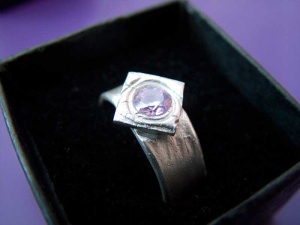
Last week, I rose early, travelled far, made a ring for my beloved, dashed home, prepared a meal, and then proposed. Busy day. We’re getting married on the 11th of August in a town in northern Germany near Dortmund.
If you know and like me or her, you’re invited to the wedding, which I hope will be quite informal but enormous fun. You should be receiving invitations soon if I’ve got your contact details (once we’ve made them all), otherwise feel free to contact me and mention that I haven’t sent you an invite yet.
She loves lizards which is why I made the ring in the shape of a lizard. Here’s me burnishing it.

and the result, after treating it:

In case the lizard didn’t turn out well, I also made a back up ring, and earrings (she likes earrings, so they were a safe choice) at the same time.

links for 2007-03-14
-
“Follow your weird, ladies and gentlemen. Forget trying to pass for normal. Follow your geekdom. Embrace your nerditude.”
-
Non violent solutions to ant biting only please
-
Cool presentation that shows how the tools and concepts have lead to the phenomenon.
OpenID
You may have realised from my technical type posts that I’m a big fan of decentralisation, at least when it comes to all things internettery. In that vein, I now have an openID thanks to phpMyID. It was very easy to install and get working, took me less than 5 minutes. https://kybernetikos.com/openid is now my openid end point, and I’ve so far successfully logged on to a bunch of openId services including ficlets.com a social fiction writing site and jyte (if you enjoyed anything on this site and want to pop over there to give me some cred for it, that’d be nice). If you don’t know how/want to set one up yourself on your own server, you can use a service like myopenid.com. You already have one if you have a yahoo account, or a wordpress.com blog.
I’d love to see this kind of single sign on succeed since single sign on is needed and the alternatives are MS passport style things. If you haven’t already got an OpenID, let me encourage you to get one, and start using it.
links for 2007-03-10
-
Jarring and signing javascript suitable for mozilla to trust.
-
Sun’s free game server system.
-
A nice overview of REST as explained to a non technical person.
-
Logic gates in Venus Flytraps
Singularity of Great Britishness
I’ve written a bit recently about the technological singularity, the idea that paradigm shifts have been increasing in frequency logarithmically, so that soon there won’t be time to do anything except paradigm shift and that will be so tiring for us that all bets are off about what we will do or become next.
Anyway, the proof of this is all here in this lovely graphic on wikipedia, collecting data from many esteemed sources (click for the big version).

Someone once pointed out to me that people tend to overvalue recent changes, because they mean more to them, and they forget or undervalue older stuff. I’ll call this the Dewhurst effect.
So my question is, are these paradigm shift graphs simply artefacts of the Dewhurst effect?
It’s very difficult to tell, but I thought one thing we could do is to generate a similar graph for something we know to be true, and see if the Dewhurst effect has had a distorting influence on that.
Everyone knows that the British are getting better and better as time goes on. There is no question that we are heading towards a singularity of greatness, when eventually so many great Britons are being born every minute that the Oxford English dictionary has to redefine greatness. Since this is a given, is there any data that I can plot to see if the Dewhurst effect has distorted the evidence for this?
Fortunately, there is. The Great British Broadcasting Corporation a few years ago ran a survey to determine the greatest britons of all time. You can read the full list on Wikipedia. I had to clean up the data a little, removing those whose names could be associated with paradigm shifts and technological discoveries to remove the influence of the technological singularity. Eventually, I got a list of musicians, politicians and humanitarians.
Here’s the graph (click for the full image).
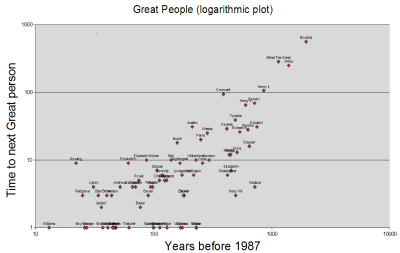
Result. Well, obviously we don’t have as many data points as all those different think tanks, (I chose 1987, because I figure it takes about 20 years for greatness to manifest, so we wouldn’t have data for the last 20 years) which means that the graph isn’t as nice, and they have data going back more than 10000 years, but there looks to be a definite straight line there to me. In fact, I think if you just consider the last 10000 years our line is actually straighter than theirs. The fact that we are producing great Britons exponentially faster as time goes on is supported by the graph, with no sign of distortion from the Dewhurst effect. Perhaps we could also use the graph predictively. According to my calculations, there was a great briton living about 600 years before Boudica, or in 560 BC, that history has forgotten. This date corresponds neatly to the start of the iron age in Britain, so I would hazard a guess that he was the one who kicked it all off.
 kybernetikos
